
RealOffice360 is a simple CRM designed to help real estate agents streamline their business and boost productivity. Its intuitive interface makes it easy to get up and running quickly.
Some standout features include automated reminders to keep in touch with clients, the ability to build customized pipelines and processes, and AI-powered communications. Lead capture tools pull in prospect information from various sources to create a centralized database. A mobile app provides agents with fast access on the go.
In testing out the CRM platform, I found it reasonably priced for the functionality, and the interface was very user-friendly. Some areas for improvement are the email marketing capabilities and the limited third-party integrations currently. But overall, RealOffice360 offers a solid set of core CRM features tailored for busy real estate professionals looking to better manage client relationships and grow their business.
RealOffice360 core capabilities
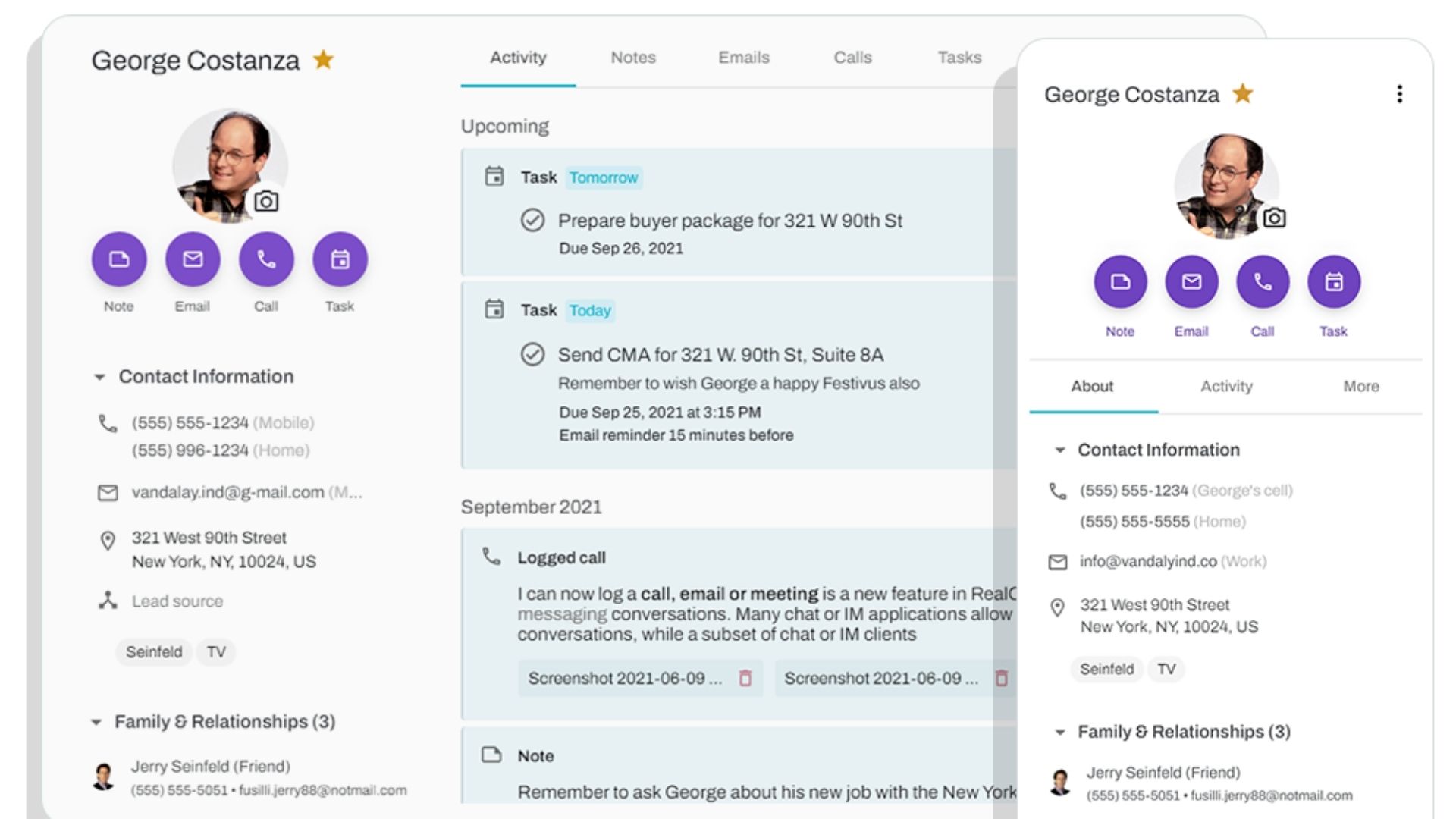
RealOffice360 provides a robust set of client management capabilities. Its all-in-one contact database lets users easily add and manage real estate clients. Contacts can be imported from various sources like Google, Outlook, iPhone, Excel, or other CRM software. The system also allows categorizing contacts with group labels and favorites to keep the database well-organized.
The client profile in RealOffice360 acts as a central hub, housing notes, communications, files, property details, and even family information all in one place. I particularly like the smart follow-up reminders for important dates like client birthdays, home purchase anniversaries, and wedding anniversaries — this enables agents to effortlessly keep in touch with past clients.
Another strength is the CRM's client communication features. It syncs emails, enables bulk emailing, provides an AI assistant to help craft professional emails, and supports customizable email signatures. Having all client interactions and touchpoints logged in one system is invaluable.
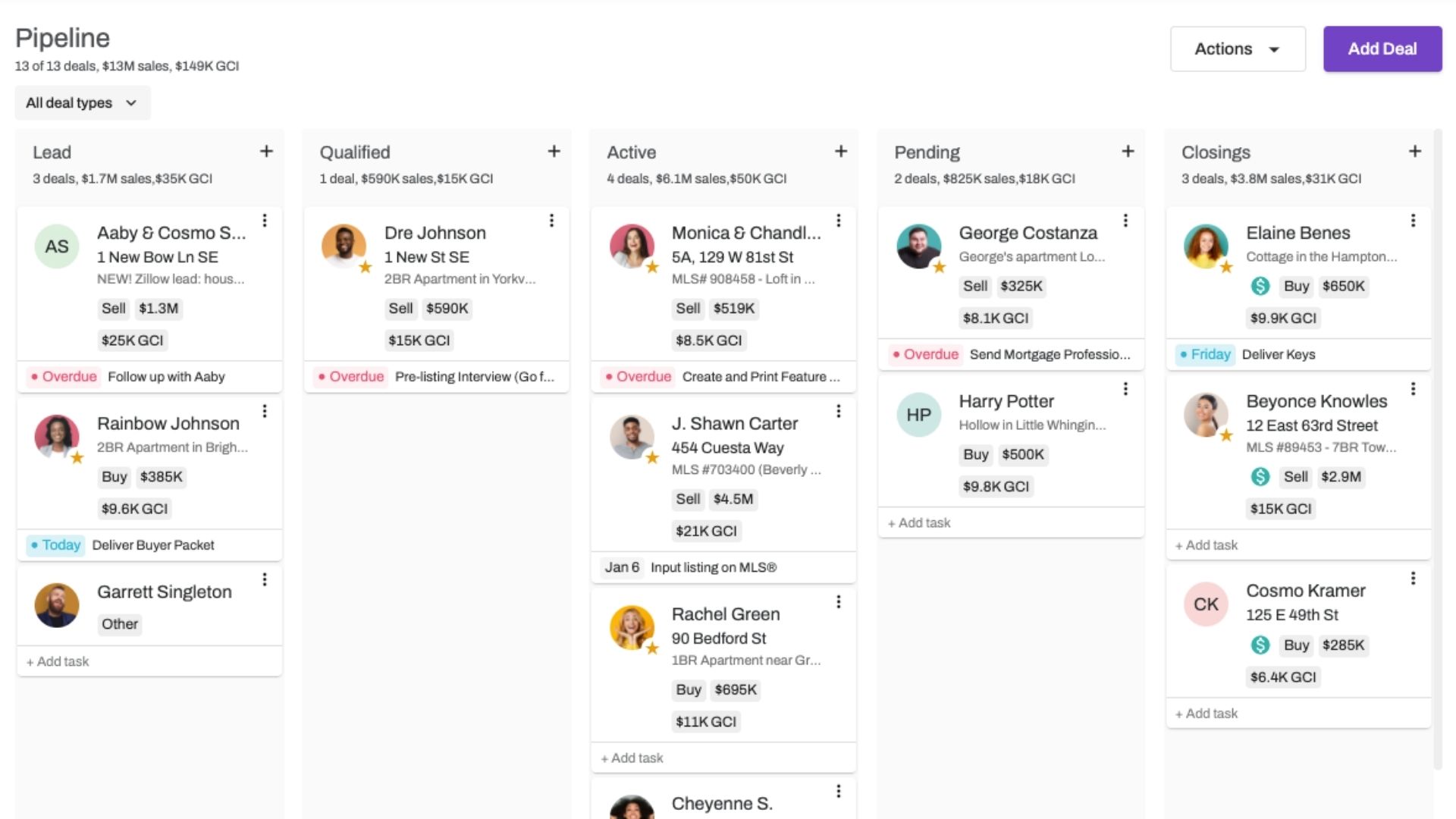
Beyond contact management, RealOffice360 CRM offers capable deal tracking functionality. Users can manage the full sales cycle, from lead capture and follow-up to commission calculations and tax handling. The visual sales pipeline with drag-and-drop controls makes it simple to advance deals to close.
Rounding out the feature set are tools for daily task management and scheduling via the built-in calendar and to-do lists. The system also provides email marketing, note-taking, data storage, and more.
But while RealOffice360 covers the CRM essentials and requirements for real estate quite well, the feature set feels a bit limited compared to some more mature mainstream players that offer deeper customization, extensibility, and third-party integrations.
How easy is RealOffice360 to use?
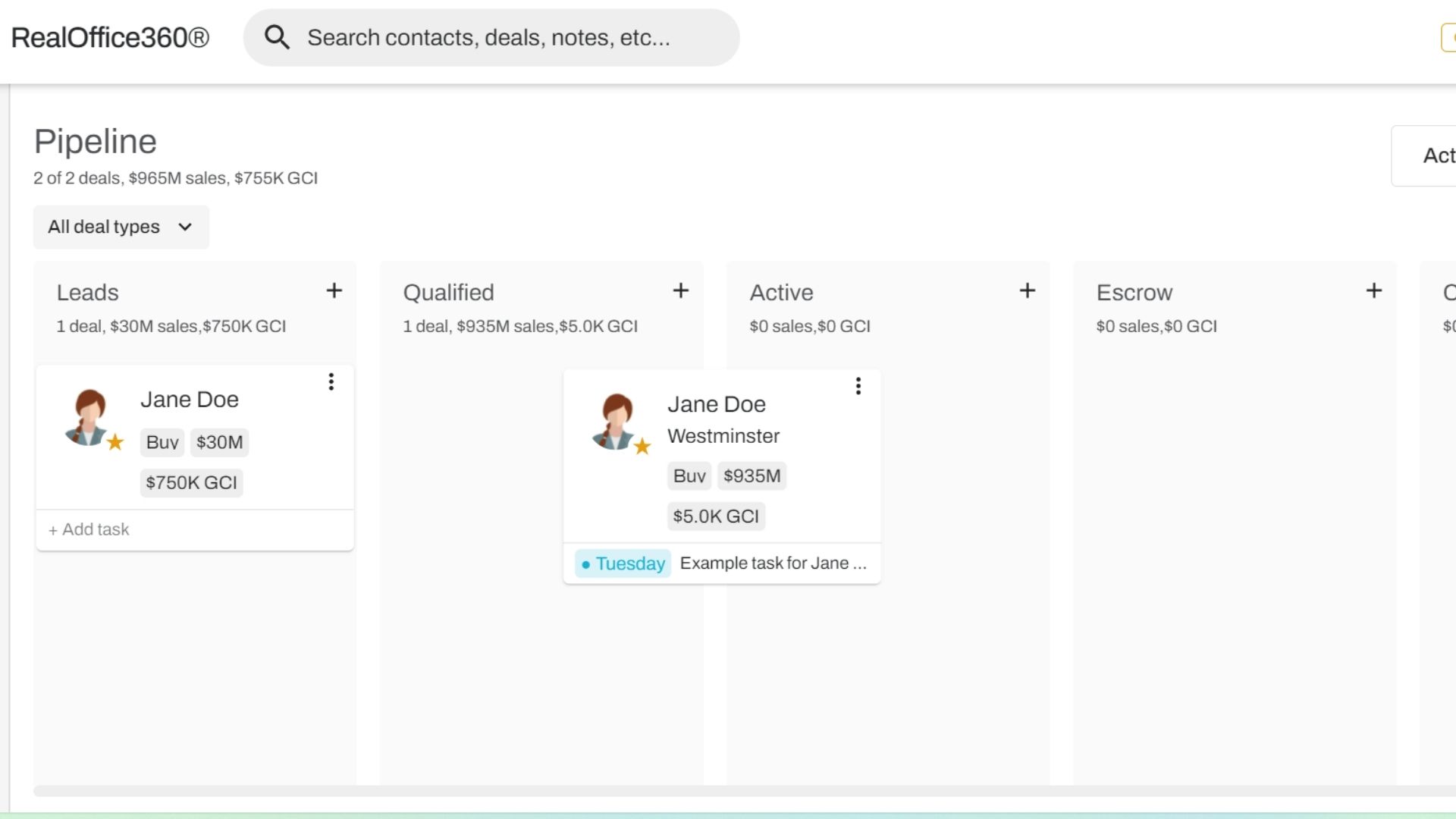
RealOffice360 shines in its simplicity and intuitiveness. The software takes a streamlined approach, stripping away unnecessary complexity to provide a clean and modern interface that is easy to navigate. Even users with minimal technical skills can quickly get up to speed and start managing their client relationships effectively.
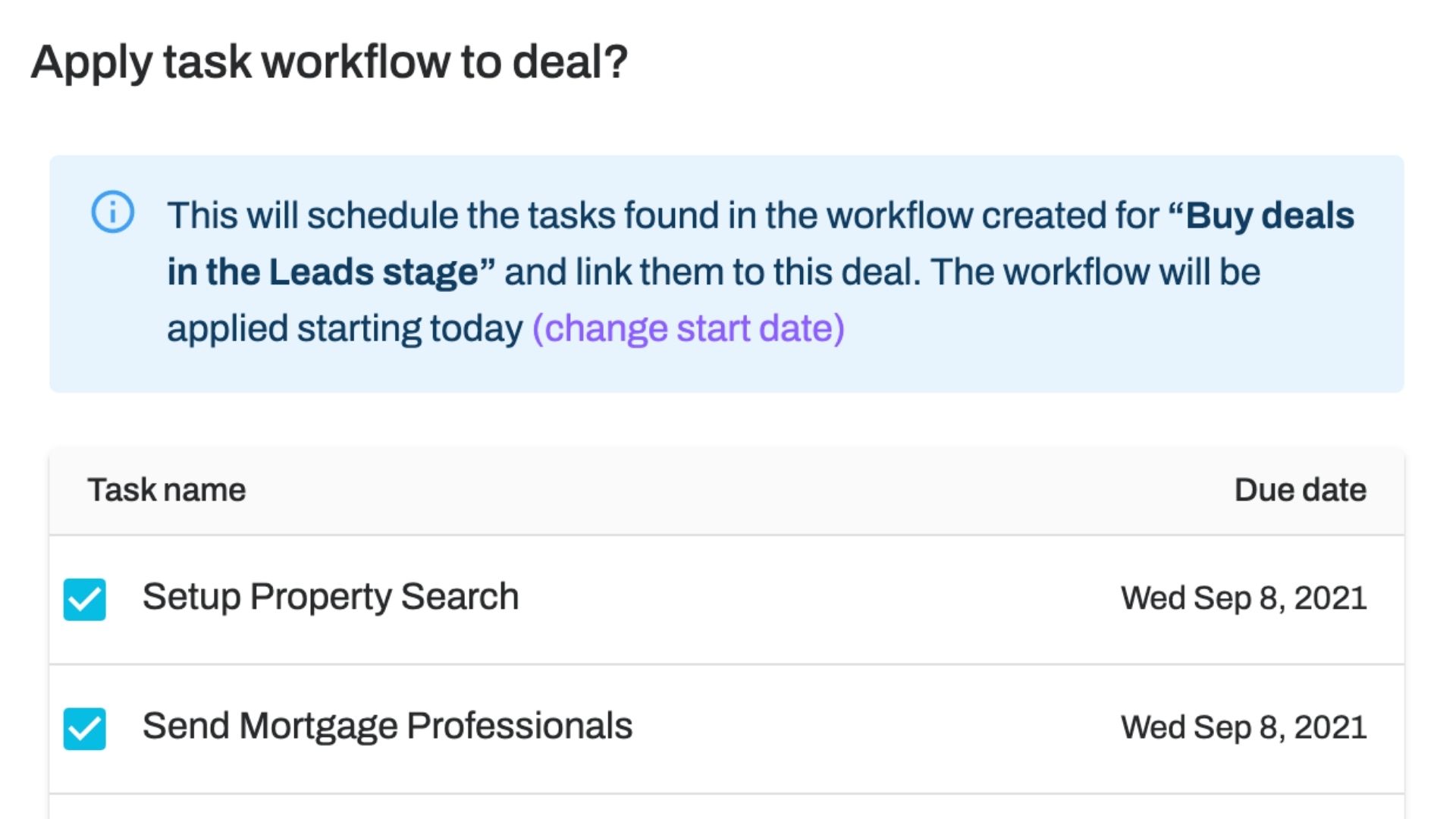
But RealOffice360 also allows you to tailor the CRM to your specific workflow and preferences. You can create custom fields, views, and pipelines to match how you do business. The flexibility means you're not forced into a rigid one-size-fits-all system. Instead, the CRM adapts to you, enhancing your work style.
The thoughtful UI design carries through to mobile, with a responsive interface that is just as intuitive on a smartphone as on a desktop. Whether you're in the office or on the go, you have full access to your client data, communications, and deal pipeline. Updates sync seamlessly so your whole team is always on the same page.
Onboarding is refreshingly painless thanks to the software's inherent simplicity. RealOffice360 provides a library of concise tutorial videos that walk you through the key features and configuration options. In my experience, most users can dive right in and learn by doing, with the videos there as a fallback for any stumbling points. The time from setup to full productivity is remarkably short compared to more complex CRM systems.
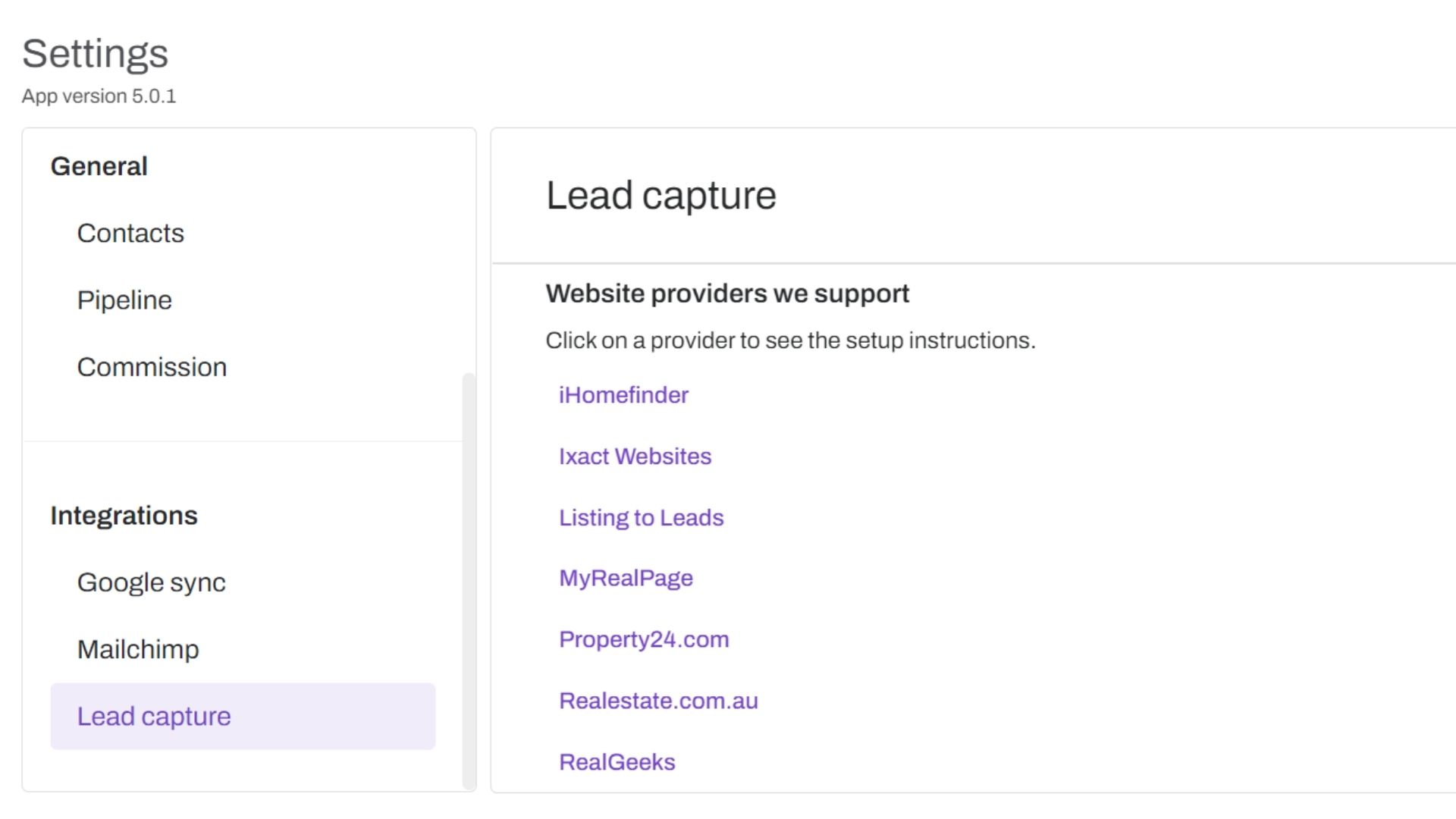
As your business evolves, RealOffice360 scales smoothly alongside you. The well-organized settings allow you to adjust your account as needed, without technical headaches. You can add new users, tweak permissions, and expand your usage while maintaining the same core interface your team is familiar with.
Sure, RealOffice360 may lack some of the advanced features found in higher-end CRM suites. But those bells and whistles often come at the cost of usability. For the vast majority of small to midsize real estate businesses, RealOffice360 delivers exactly what's needed in a package that's intuitive, accessible, and easy to adopt.
Integrations
RealOffice360 has been putting in more effort into making the CRM integrate with other business software, which is important for any modern CRM. The product supports pre-built integrations with popular apps like Gmail, Outlook, Slack, QuickBooks, and more, allowing data to flow seamlessly between systems.
RealOffice360 also has an open API that enables developers to build custom integrations. While the API documentation could be more comprehensive, it does cover the core CRM objects and allows pulling data into 3rd party apps. The API supports both REST and Webhooks for real-time notifications.
For non-technical users, RealOffice360 offers integration with Zapier, a leading iPaaS. This opens up connections to 1000s of apps without needing to write code. Setting up Zaps was relatively intuitive when I tested it. RealOffice360 has provided Zapier triggers for common events like new lead created, deal updated, etc., which can then kick off actions in other apps.
One area I'd like to see RealOffice360 improve is the breadth of its pre-built integrations. Several CRMs that I've reviewed have marketplaces with hundreds of apps that integrate out of the box. RealOffice360's selection is more limited currently. Expanding this, as well as creating more comprehensive docs for the API, could make the platform even more extendable.
How good is RealOffice360 support?
RealOffice360 offers a few key channels for users to get assistance, such as email, chat, and self-service.
Live chat support is available, allowing customers to get quick answers to their questions or concerns directly through the platform. This is a convenient option that can provide more immediate help compared to other methods.
In terms of self-service resources, RealOffice360 maintains a fairly comprehensive online knowledge base. This searchable support hub contains helpful articles, tutorials, and FAQs across a range of topics. It's a good first stop for users looking to troubleshoot issues on their own or learn more about certain features.
RealOffice360's documentation doesn't specify average first response or resolution times, which would be helpful to know. Responsiveness and the speed at which issues get resolved are important factors in evaluating support quality.
From the user reviews I came across, it seems that support does earn some praise. Several customers mentioned that the support team was helpful and ensured their problems were solved. Of course, a broader set of testimonials would paint a clearer picture.
One potential limitation is that live support via chat and email is only available on weekdays from 11 am-7 pm EST. Round-the-clock coverage would be better for users in different time zones or those who need assistance outside regular business hours.
The free plan also has a slower 48-hour maximum response time, compared to higher tiers. While understandable, it's something for free users to keep in mind.
RealOffice360 pricing and plans
Swipe to scroll horizontally
Price | $12/user/month | $25/user/month | $50/user/month |
Best For | Solo agents starting with CRM tools | Agents needing advanced marketing features | Teams requiring collaboration and shared data |
Features | Unlimited contacts Task calendar Deal tracking | Customizable workflows Bulk email AI assistant features | Collaborative calendars Team management Shared pipelines |
Limitations | Limited to basic CRM functions | Advanced features at higher cost | Additional users cost extra |
The first thing that stands out to me about RealOffice360 is their very generous 14-day free trial, which doesn't even require a credit card to get started. This makes it easy and risk-free to fully test drive the platform before making any financial commitment.
Once you're ready to upgrade, their paid plans start at a very reasonable $12 per month for solo agents on the Essentials plan. This gets you access to their core CRM features for managing your contacts, properties, and transactions.
Stepping up to their Premium plan at $25 per month unlocks some powerful automation capabilities, like email syncing and customizable workflows, that can really streamline your business. For an individual agent, this tier likely provides the best bang for your buck.
Small teams will appreciate the affordability of RealOffice360's Team plan, which supports 2 users for $50 per month, with additional seats at $30 each. So a team of 5 could get everyone up and running for around $140 monthly. The inclusion of team-oriented features at this level, like shared calendars and pipelines, adds a lot of collaborative value.
Larger brokerages with many agents have access to volume pricing starting at $125 per month for unlimited users. This allows bigger firms to take advantage of RealOffice360's capabilities at scale.
Other factors that enhance RealOffice360's pricing attractiveness are the lack of any long-term contracts or cancellation penalties, and the ability to save up to 20% by opting for annual billing. All in all, RealOffice360 delivers robust CRM functionality at price points that should fit comfortably within most real estate businesses' budgets.
RealOffice360 CRM review: Final verdict
After an in-depth evaluation, RealOffice360 emerges as a solid CRM contender purpose-built for real estate professionals. Its intuitive interface and streamlined feature set make it easy to adopt and use on a daily basis to manage contacts, properties, and deals.
A major strength lies in RealOffice360's ability to facilitate collaboration among real estate teams. The software allows assigning properties, tasks, and commissions to specific team members, ensuring clarity and accountability. The visual deal pipeline is also a standout, enabling agents to easily track and advance sales opportunities.
RealOffice360's customer support is another bright spot. The company offers live chat and phone support on weekdays, along with a searchable online knowledge base for self-service.
However, RealOffice360 does have some room for improvement in terms of customization and integration. The platform provides limited ability to personalize data fields, reports, and pipeline views. Additionally, while it offers essential integrations with email and calendar tools, the breadth of third-party app connections trails some competitors. Security-conscious firms may also find the lack of two-factor authentication problematic.








 English (US) ·